← Blog from Guindo Design, Strategic Digital Product Design
Accessibility (and its tools) should be invisible
Not long ago, when presenting Jeikin To a developer, they dropped a sentence on me that I expected sooner or later: “Why would I want another tool if I can add accessibility rules to my CLAUDE.md?”.
In part he was right: you can write «follow the WCAG AA» in your AI instructions and the agent will try. It will put some alt From time to time, it will use semantic HTML if it remembers and suggest ARIA attributes it has seen on other sites.
But ask that same AI to review the code tomorrow and it won't remember what it found yesterday. Ask it whether the Bug fix What was applied last week passed the cut-off rules, or try to demonstrate to an auditor that each component has been reviewed. There's no trace of anything.
Instructions without control are just suggestions, and suggestions die in the face of a deadline, a change of equipment or an inspector demanding evidence.
The compliance gap
From June 2025, the European Accessibility Act (EAA) It is no longer a recommendation, it is an obligation. France has already given touches to major retailers y las multas pueden llegar a los 3 millones de euros o al 4% de la facturación.
For product teams, the question is no longer «do we care about accessibility», but «can we prove we are compliant? And this is where the current model fails: an AI can write accessible code, but it can't audit what it has done, verify that the Repairs pass quality controls or generate a history for an audit. That is system capability, not instruction capability.
«We asked the AI to comply with WCAG» is not a test. «Here is the Dashboard with 86 criteria evaluated and 12 errors corrected» is.
What the AI sees (and what it ignores)
WCAG 2.2 has 86 criteria. AI is good at detecting structural issues (header hierarchy, missing labels), but there's a critical part it misses:
- The order of the focus is only seen in execution.
- Contrast depends on calculated styles, not just code.
- Shortcuts or keyboard navigation require real simulation.
- Chromatic vision (deuteranopia, protanopia) needs visual verification, not only logical.
Today, we believe that the winning approach is layered: static analysis (ESLint) captures the 30% of errors and the scanning in runtime (axe-core) another 30%. For the remaining 40%, guided human review remains indispensable: cognitive load, reading order, etc.
An invisible workflow
At Guindo, when we design tools, we have a motto: Accessibility should be invisible to the workflow. We are not talking about overlays useless, but rather that the developer does not have to leave his environment.
That's why we have integrated Jeikin where the action takes place:
- In the editor: Through MCP, you connect your AI to a real compliance system. They are not just prompts; If the AI finds a fault, it logs it. If it tries to fix it, the system verifies that the fix It works. If it doesn't pass the test, it's not marked as resolved. The cycle closes: find, report, fix, verify.
- In the Pull Request: Jeikin reviews each RP before the Blend. Errors appear as comments in the code, with their severity and the affected WCAG criterion. If there are critical infringements, the Blend crashes. It is the safety net for when the AI hallucinates or the developer skips a step.
- In the Dashboard: All the effort is translated into data. Evidence for the auditor, peace of mind for the product manager.
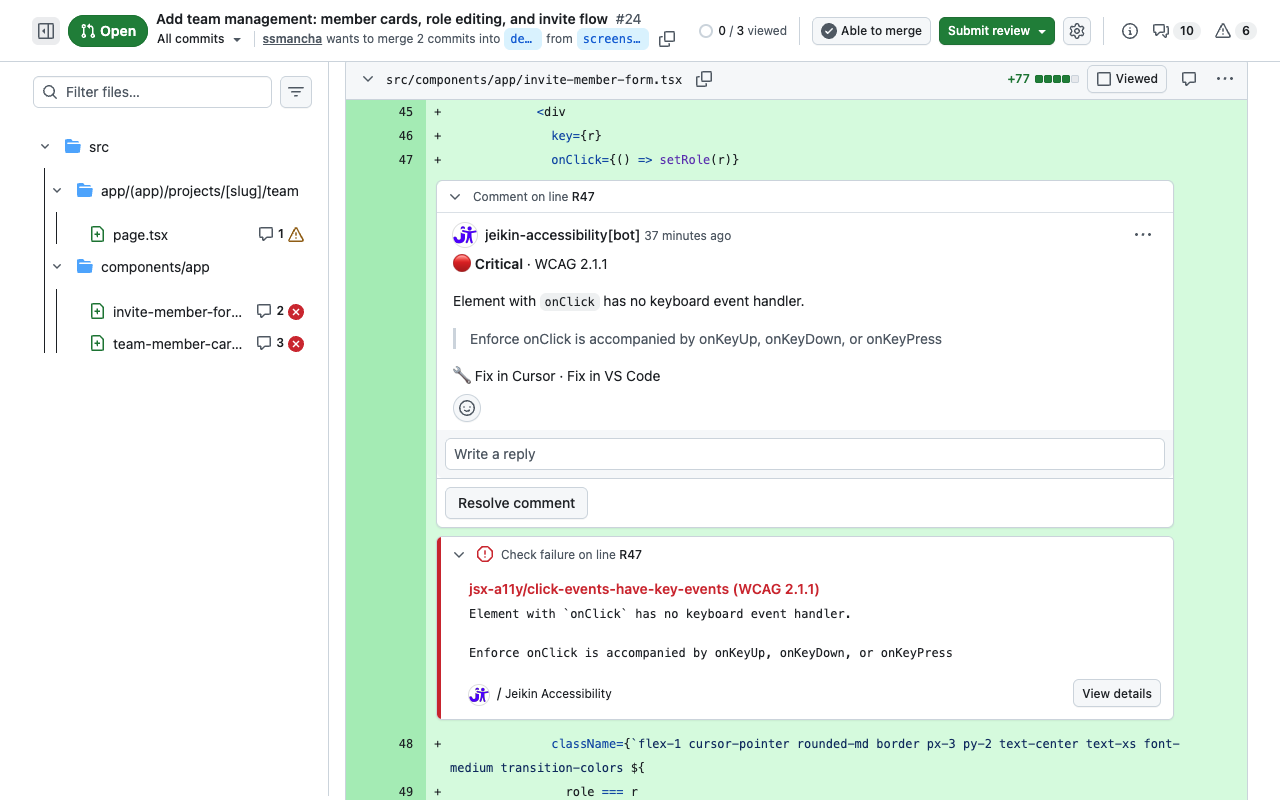
Instructions vs. system
Many insist: «My AI already follows my rules», but there are things that a text file cannot do for you:
- Traceability: Know what has been reviewed and what has been left out.
- Execution: Blocking a Blend If the code is inaccessible.
- Persistence The AI forgets to log off; the system does not.
- Real-world tests Simulate APCA contrasts or keyboard navigation.
Instructions are the starting point, but a compliance system is the complete loop. It is this loop that prevents regression and makes accessibility a tangible and demonstrable reality.
Try it and tell us what you think.: Install the extension and pass a review. It's common to find barriers you didn't even know were there, not because the code is bad, but because accessibility is invisible until someone decides to take a real look.